
AdsPower Pricing Explained: Plans, Costs & Free Plan (November 2026)
Updated: November 2026
AdsPower is one of the most popular antidetect browsers for managing multiple accounts. It’s used by marketing agencies, e-commerce sellers and social media teams. Its pricing is flexible, but that flexibility can make it confusing: the price depends on how many browser profiles you need, how many team members will use the account, and how long you pay for in advance.
In this guide we break down how AdsPower pricing works, what each plan costs, what the free plan really includes, and how to choose the right plan without paying for profiles you’ll never use.
AdsPower pricing at a glance
- Free plan: $0 forever, 2 browser profiles
- Professional: from about $9/month for 10 profiles, or about $5.40/month billed annually
- Business: for larger teams, starting at 200 profiles
- Enterprise: custom pricing for 5,000+ profiles
- Save 15% with quarterly billing and up to 40% with annual billing
- 7-day free trial of all features
How AdsPower pricing works
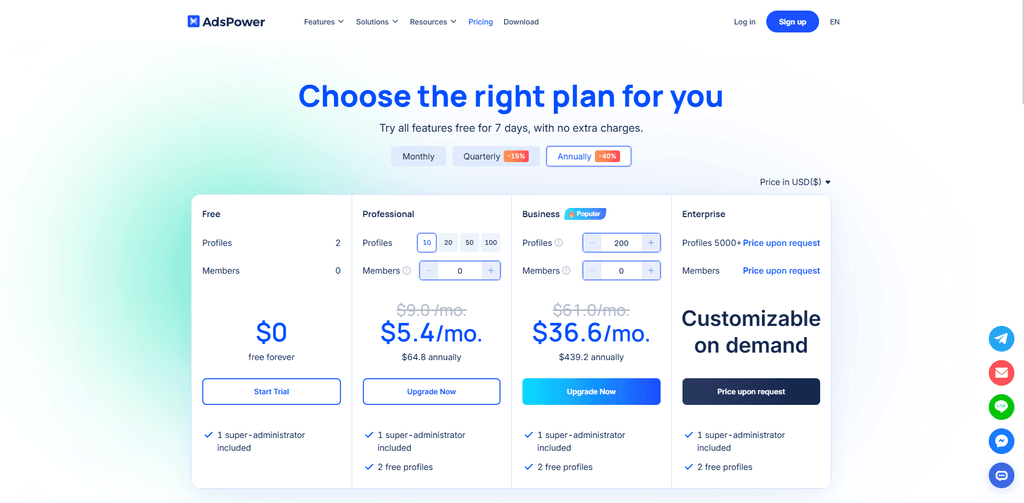
AdsPower doesn’t sell fixed packages. Instead, you build your plan from three parts:
- Number of browser profiles. A profile is a separate browser environment with its own fingerprint, cookies and proxy. Most people need one profile per account they manage. This is the main factor in the price.
- Number of team members. If other people need access to your profiles, you add team member seats. Solo users don’t need any.
- Billing period. Monthly, quarterly or annual. The longer you pay in advance, the bigger the discount.
Every plan comes with one super-administrator (that’s you), and paid plans include 2 extra free profiles on top of the number you buy. You can upgrade or adjust your plan later from the Cost Center in your account.
AdsPower Free plan
AdsPower offers a free plan with no time limit. It includes 2 browser profiles and one administrator, with no extra team members. That’s enough to try the browser properly: you can set up fingerprints, connect proxies, and test RPA automation and the local API.
The free plan is great for learning the tool or managing a couple of personal accounts. Its limits show up quickly once you work at scale: there are only two profiles, no team access, and some management features such as batch operations, trash recovery and detailed team permissions are reserved for paid plans.
AdsPower Professional plan
Professional is the plan most freelancers and small teams choose. You select how many profiles you need, from 10 up to 100, and pay accordingly. Here’s what it costs with each billing period:
| Profiles | Monthly | Quarterly (−15%) | Annual (−40%) |
|---|---|---|---|
| 10 | $9.00/mo | ≈ $7.65/mo | ≈ $5.40/mo |
| 20 | $12.00/mo | ≈ $10.20/mo | ≈ $7.20/mo |
| 50 | $21.00/mo | ≈ $17.85/mo | ≈ $12.60/mo |
| 100 | $36.00/mo | ≈ $30.60/mo | ≈ $21.60/mo |
Notice how the price per profile drops as you buy more. Ten profiles cost about $0.90 each per month, while 100 profiles cost about $0.36 each. If you’re growing quickly, a bigger package can be cheaper per account than buying in small steps.
Professional includes all the core features: Chrome-based and Firefox-based browser engines, custom fingerprints, proxy setup, encrypted profile data, sync across computers, batch management, the Synchronizer, RPA workflows and the local API. Team members can be added as an option.
AdsPower Business plan
Business is designed for agencies and companies that manage hundreds of accounts and work in teams. It starts at 200 profiles for about $61/month on monthly billing, and the price scales with the number of profiles and team members you add. With annual billing, the monthly cost drops significantly.
The main reasons to choose Business over Professional are scale and teamwork: more profiles, more team member seats, flexible permissions for each member, and higher API limits for automation-heavy workflows.
AdsPower Enterprise plan
Enterprise is for very large operations with 5,000+ profiles. Pricing is custom and quoted on request, and the plan can be tailored to your workflow. If you’re at this scale, contact AdsPower’s sales team directly. Volume pricing is usually much better than list prices.
Monthly vs quarterly vs annual billing
AdsPower rewards longer commitments. Quarterly billing saves 15%, and annual billing saves up to 40% compared with paying month by month. Here’s what that means for a 10-profile Professional plan over a full year:
| Billing period | Cost per month | Cost per year | You save |
|---|---|---|---|
| Monthly | $9.00 | $108.00 | – |
| Quarterly | ≈ $7.65 | ≈ $91.80 | ≈ $16 |
| Annual | ≈ $5.40 | ≈ $64.80 | ≈ $43 |
Our advice: start monthly while you’re figuring out how many profiles you really need. Once your setup is stable, switching to annual billing is the easiest way to cut your AdsPower bill almost in half.
What’s included: Free vs paid plans
| Feature | Free | Professional | Business |
|---|---|---|---|
| Browser profiles | 2 | 10–100 (+2 free) | 200+ (+2 free) |
| Team members | No | Optional add-on | Yes, adjustable |
| Custom fingerprints | Yes | Yes | Yes |
| Proxy per profile | Yes | Yes | Yes |
| Chrome and Firefox engines | Yes | Yes | Yes |
| Sync across computers | Yes | Yes | Yes |
| RPA automation and Synchronizer | Basic | Yes | Yes |
| Local API | Lower limit | Yes | Higher limit |
| Batch management and trash recovery | No | Yes | Yes |
| Member permissions and profile sharing | No | Yes | Yes |
Exact limits per plan can change. Check the comparison table on the AdsPower pricing page before you buy.
AdsPower free trial
Besides the permanent free plan, AdsPower lets you try all features free for 7 days. It’s the best way to test paid features such as batch management, team permissions and advanced automation before you commit. After the trial, you can stay on the free plan or upgrade to a paid one.
Payment methods
AdsPower accepts several payment methods, including bank cards, PayPal and popular cryptocurrencies. Prices are shown in US dollars by default, and a few local currencies are also available. The full list of payment options appears at checkout and can depend on your region.
How much will AdsPower cost you? Real examples
| Who you are | Suggested plan | Approximate cost |
|---|---|---|
| Testing the tool or managing 1–2 accounts | Free | $0 |
| Freelancer managing up to 10 accounts | Professional, 10 profiles | $9/mo or ≈ $5.40/mo annually |
| Small agency with a few clients | Professional, 50 profiles + team members | from $21/mo + members |
| E-commerce team with many store accounts | Professional, 100 profiles | $36/mo or ≈ $21.60/mo annually |
| Large agency or company | Business, 200+ profiles | from ≈ $61/mo |
A freelancer managing client ad accounts
If you run social media or ad accounts for a handful of clients, the 10-profile Professional plan is enough. Each client gets their own profile, so logins, cookies and settings never mix. On annual billing, that’s around $65 for the whole year.
A small marketing agency
An agency with several employees needs profiles plus team seats. A 50-profile Professional plan with a few team members lets you give each employee access only to the clients they work on, without sharing passwords. Permissions can be removed instantly when someone leaves the team.
An e-commerce business
Sellers who run stores on several marketplaces or regions often need dozens of separate environments. The 100-profile tier gives the best price per profile on Professional, and RPA automation can take over repetitive tasks such as checking orders or updating listings.
How to save money on AdsPower
- Start with the free plan or 7-day trial. Make sure AdsPower fits your workflow before paying anything.
- Count your profiles honestly. Most people need one profile per account. Don’t buy 100 if you’ll use 20.
- Remember the 2 bonus profiles. Paid plans include 2 extra free profiles, which may let you choose a smaller tier.
- Switch to annual billing once you’re settled. It saves up to 40% compared with monthly payments.
- Add team seats only when needed. Solo users don’t need any, and you can add more later.
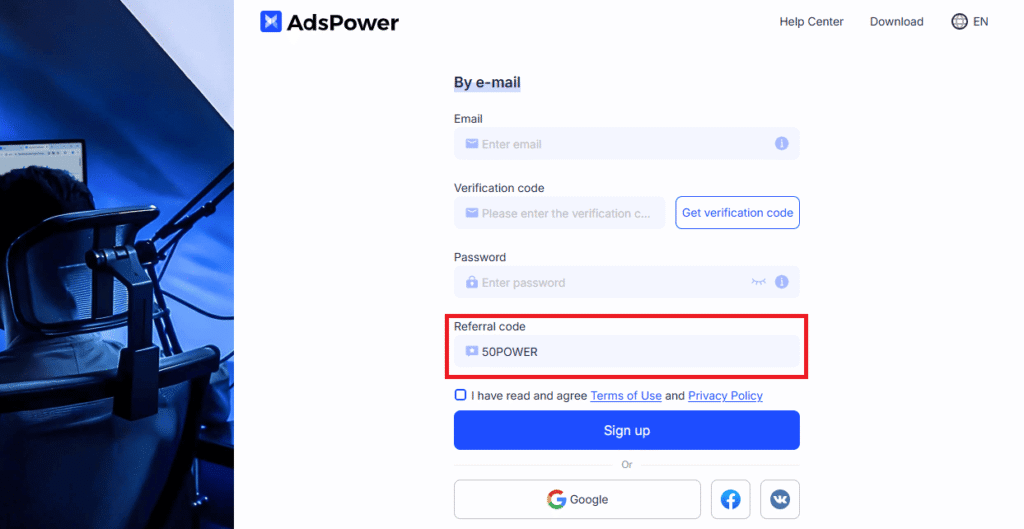
- Use a referral code at sign-up. New users can get a discount on their first subscription by entering referral code 50POWER in the Referral code field when they create an account. Other current offers are listed on our AdsPower promo codes page.
- Clean up unused profiles. If your number of accounts drops, downgrade to a smaller tier at your next renewal.
Is AdsPower worth the price?
For most users, yes. AdsPower’s entry price is low, the free plan lets you test it without risk, and the cost per profile falls as you scale. Features that some competitors reserve for expensive tiers, such as RPA automation, a local API and both Chrome and Firefox engines, are available across plans.
| Pros | Cons |
|---|---|
| Free plan with no time limit | Free plan has only 2 profiles |
| Low entry price, from about $9/month | Team member seats cost extra |
| Up to 40% off with annual billing | Best prices require paying a year in advance |
| Price per profile drops as you scale | Plan builder can feel complicated at first |
| RPA, API and two browser engines included | Enterprise pricing isn’t public |
| 7-day trial of all features |
AdsPower is a strong choice for freelancers, agencies and e-commerce teams that need to keep many accounts organized and separate. If you only manage one or two accounts, the free plan may be all you ever need.
AdsPower pricing FAQ
How much does AdsPower cost?
AdsPower has a free plan with 2 profiles. Paid Professional plans start at about $9/month for 10 profiles, or about $5.40/month with annual billing. Business plans for larger teams start at 200 profiles, and Enterprise pricing for 5,000+ profiles is custom.
Is AdsPower free?
Yes, AdsPower has a free-forever plan with 2 browser profiles. There’s also a 7-day free trial that unlocks all features, so you can test paid functions before upgrading.
What is a profile in AdsPower?
A profile is a separate browser environment with its own fingerprint, cookies, storage and proxy settings. Each profile behaves like a different device, so accounts in different profiles stay separate.
Does AdsPower offer annual discounts?
Yes. Quarterly billing saves 15%, and annual billing saves up to 40% compared with paying monthly.
Can I change my AdsPower plan later?
Yes. You can upgrade your plan or adjust the number of profiles and team members from the Cost Center in your account. For larger custom setups, contact AdsPower support.
Do team members cost extra?
Every plan includes one super-administrator. Additional team members are added to your plan and increase the price, so solo users pay only for profiles.
Is there an AdsPower discount for new users?
Yes. New users can save on their first subscription by entering referral code 50POWER in the Referral code field when they sign up. The code must be added during registration. All current offers are listed on our AdsPower promo codes page.
Final thoughts
AdsPower pricing comes down to one question: how many separate accounts do you need to manage? Start with the free plan or the 7-day trial, pick a Professional tier that matches your real number of accounts, and switch to annual billing once your setup is stable. Agencies and larger teams can move to Business as they grow, and paying for exactly what you use keeps AdsPower one of the more affordable ways to manage accounts at scale.
Prices are in USD and exclude taxes. Prices marked “≈” are calculated from AdsPower’s listed discounts and may differ slightly at checkout. AdsPower can change its prices at any time, so always confirm the final amount on the official pricing page.
Disclosure: some links on PromoFoxx are affiliate links. If you buy through them, we may earn a commission at no extra cost to you.