+3% Sell Bonus
Code
Verified
Get a 3% bonus on the value of the skins you sell.
Did it work?


SkinCashier
We may earn a commission when you use our links. Learn more
Get a 3% bonus on the value of the skins you sell.
Choose one of the SkinCashier promo codes above and click Show code. The code is copied to your clipboard automatically, and the SkinCashier website opens in a new tab.
Log in to SkinCashier with your Steam account. Make sure your Steam inventory is public and Steam Guard is enabled, so you can sell your items.
Go to the page where you sell your skins. Your Steam inventory loads automatically with the price offered for each item.
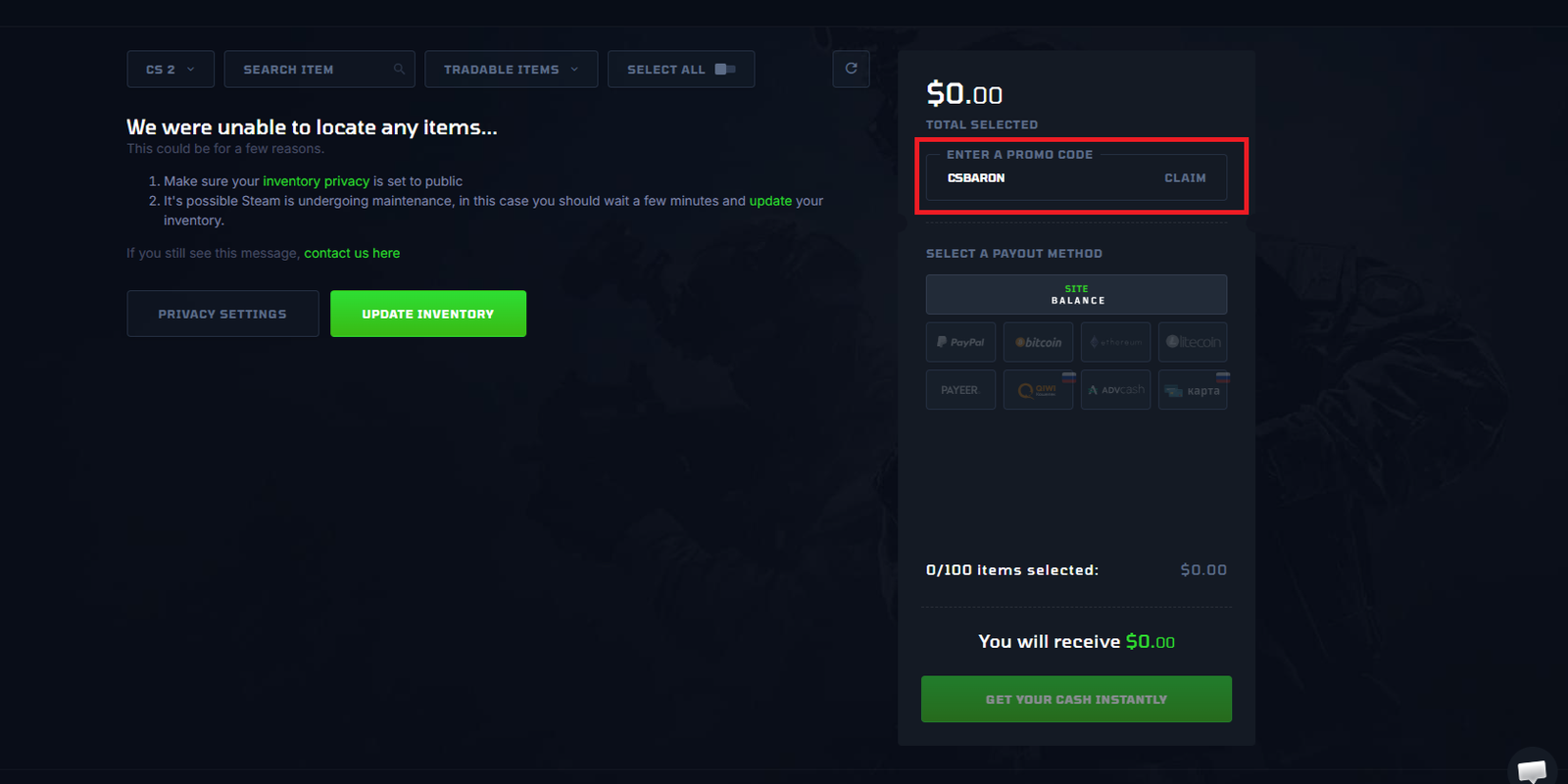
Find the Promo code field on the sell page, paste the code and click Claim. The 3% bonus is added to the value of the items you sell.
Choose the skins you want to sell, check the total with your bonus and confirm. Accept the trade offer from SkinCashier's bot in Steam and receive your payout.
Make sure you copied the full code without extra spaces and that you're signed in. Enter the code before you confirm the sale, so the bonus is included in your payout. Check the conditions shown under the code on this page.
SkinCashier is a service that buys CS2, Rust, Dota 2 and TF2 skins for real money. You sell your items directly to the site at the offered price and get paid via PayPal, crypto or other payout methods.
Go to the sell page, find the Promo code field, enter CSBARON and click Claim. Then select your items and complete the sale. The 3% bonus is added to your payout.
Yes. Use promo code CSBARON to get a 3% bonus on the value of the skins you sell. The bonus applies to your whole sale, so the more items you sell, the bigger your bonus.
Enter CSBARON before you confirm the sale, so the 3% bonus is included in your payout.
Sign in with your Steam account, select the skins you want to sell and confirm the sale. SkinCashier’s bot sends you a trade offer in Steam. Once you accept it, the money is sent to your chosen payout method.
SkinCashier has been buying and selling skins for many years and uses Steam’s official trade offer system, so you always see exactly which items you’re sending before you confirm. As with any trading site, open it only from its official address and check every trade offer carefully.
SkinCashier pays out via PayPal, cryptocurrencies such as Bitcoin, Ethereum and Litecoin, e-wallets like Payeer and AdvCash, and bank transfer. The available options may depend on your country.
SkinCashier is a service for selling CS2, Rust, Dota 2 and TF2 skins for real money. Instead of listing your items on a marketplace and waiting for a buyer, you sell them directly to SkinCashier at the price shown on the site. It's a simple way to turn skins you no longer use into cash.
The process is quick: sign in with your Steam account, choose the items you want to sell from your inventory, and accept the trade offer from SkinCashier's bot. Once the trade is complete, the money is sent to your chosen payout method.
SkinCashier supports several payout options, including PayPal, cryptocurrencies such as Bitcoin, Ethereum and Litecoin, e-wallets like Payeer and AdvCash, and bank transfer. This flexibility makes it convenient for sellers in many countries.
To sell on SkinCashier, your Steam account needs to meet a few basic requirements: Steam Guard must be active for at least 15 days, your inventory must be public, and your account shouldn't have any trade restrictions. These are standard safety rules that protect both sellers and the platform.
You can also get more for your items with a SkinCashier promo code. With the code on this page, you receive a 3% bonus on the value of the skins you sell. The bonus applies to your whole sale, so the more items you sell, the bigger your bonus.