

Cloudways Pricing Explained: Plans, Real Costs & Hidden Fees (November 2026)
Updated: November 2026
Cloudways pricing looks confusing at first. There are two product lines, several cloud providers, dozens of server sizes, hourly billing and a list of optional add-ons. Compared with a typical web host that shows three neat “Basic / Plus / Pro” boxes, it can be hard to tell what you’ll actually pay.
The good news: once you understand the logic behind it, Cloudways is one of the most transparent hosting providers around. There are no teaser prices that triple on renewal and no long contracts. In this guide we break down how Cloudways pricing works, what every plan costs, what’s included for free, which extra fees can appear on your bill, and how to choose the right plan without overpaying.
Cloudways pricing at a glance

- Flexible plans start at $11/month (DigitalOcean, 1GB RAM)
- Autonomous plans start at $99/month
- Flexible servers are billed by the hour, capped at the monthly price
- No contracts and no renewal price increases
- Free 3-day trial, no credit card required
- Domain names and email hosting are not included
How Cloudways pricing works
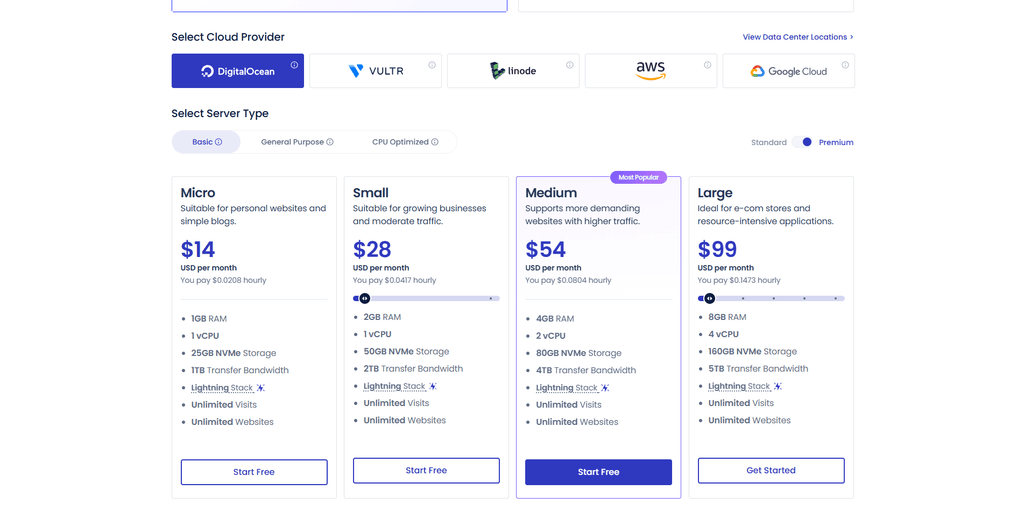
Most hosting companies sell packages: a fixed amount of space on a shared server, usually paid one to three years in advance. Cloudways works differently. It sells managed cloud servers. You choose a cloud provider and a server size, and Cloudways sets up, secures, updates, monitors and backs up that server for you.
The price you see on the Cloudways website is a single combined number. It includes the cost of the cloud server itself (from DigitalOcean, Vultr, AWS or Google Cloud) plus Cloudways’ fee for managing it. You never pay the cloud provider separately: everything appears on one Cloudways invoice.
Four things determine your monthly bill:
- Product line. Flexible lets you pick and resize your own server. Autonomous is a fully managed WordPress platform that scales automatically.
- Cloud provider. DigitalOcean and Vultr are the most affordable. AWS and Google Cloud cost noticeably more for similar resources.
- Server size. More RAM, CPU cores and storage mean a higher price.
- Add-ons and usage. Extra bandwidth, off-site backup storage, business email, Cloudflare Enterprise and premium support are charged separately.
Hourly billing explained
Flexible servers are billed by the hour, and the total for a month never goes above the monthly price shown on the pricing page. For example, the entry DigitalOcean server costs about $0.036 per hour or $11 per month, whichever is lower.
This has a few practical benefits:
- If you launch a test server for two days and then delete it, you pay for two days, not a full month.
- If you upgrade to a bigger server mid-month, you pay the old rate up to the upgrade and the new rate after it.
- There’s nothing to “cancel” in the traditional sense. When you delete a server, charges for it stop.
Cloudways invoices you once a month for the usage of the previous period. You need a payment method on file once you move from the free trial to a paid account.
No contracts, no renewal surprises
Budget hosts often advertise prices like $2.99/month, but that rate usually requires paying for three years up front, and the price jumps two or three times higher at renewal. Cloudways doesn’t do this. The price you pay in month one is the same price you pay in month twelve, unless you change your server or Cloudways changes its public price list.
Cloudways Flexible pricing
Flexible is the classic Cloudways product and the right choice for most websites. You pick the exact server you want, and you can resize it at any time from the dashboard. Every Flexible server lets you host unlimited websites and applications, so you’re paying for server resources, not per site. That makes it especially attractive for agencies and anyone running more than one website.
Flexible supports WordPress, WooCommerce, Magento, Laravel, plain PHP and several other applications, all installable in one click.
DigitalOcean plans (most popular)
DigitalOcean is the default option and offers the best value for most small and medium sites. These are the main server sizes:
| RAM | CPU | Storage | Bandwidth | Price/month |
|---|---|---|---|---|
| 1 GB | 1 core | 25 GB | 1 TB | $11 |
| 2 GB | 1 core | 50 GB | 2 TB | ≈ $24 |
| 4 GB | 2 cores | 80 GB | 4 TB | ≈ $46 |
| 8 GB | 4 cores | 160 GB | 5 TB | $88 |
| 16 GB | 8 cores | 320 GB | 6 TB | ≈ $149 |
| 128 GB | 24 cores | 2,560 GB | 11 TB | $342 |
DigitalOcean comes in two server types:
- Standard servers are the cheapest and work well for blogs, portfolios and business websites.
- Premium servers use newer CPUs and faster NVMe storage. They cost a few dollars more (from about $14/month) but handle dynamic sites such as WooCommerce stores and membership sites noticeably better.
Vultr plans
Vultr is priced close to DigitalOcean. Its High Frequency servers start at about $16/month and use high-clock CPUs with NVMe drives, which makes them one of the fastest options on Cloudways for the money. Vultr also has data centers in many cities, which helps if your audience is concentrated in a region where DigitalOcean has no location.
AWS and Google Cloud plans
Amazon Web Services and Google Cloud are the premium options. Entry servers start at roughly $37–39/month, and bandwidth isn’t bundled: it’s billed separately on usage (around $0.12/GB on AWS and $0.10–0.17/GB on Google Cloud, depending on the region).
These providers make sense if your business needs a specific AWS or Google region, already uses other AWS or Google services, or has compliance requirements tied to those platforms. For a blog, a small shop or a typical business site, they’re usually more than you need.
| Provider | Starting price | Bandwidth | Best for |
|---|---|---|---|
| DigitalOcean Standard | $11/month | Included (from 1 TB) | Blogs, small business sites, beginners |
| DigitalOcean Premium | ≈ $14/month | Included | WooCommerce and faster dynamic sites |
| Vultr High Frequency | ≈ $16/month | Included | Speed-focused sites, more locations |
| Google Cloud | ≈ $37/month | Pay per GB | Businesses in the Google ecosystem |
| AWS | ≈ $39/month | Pay per GB | Enterprise needs, specific AWS regions |
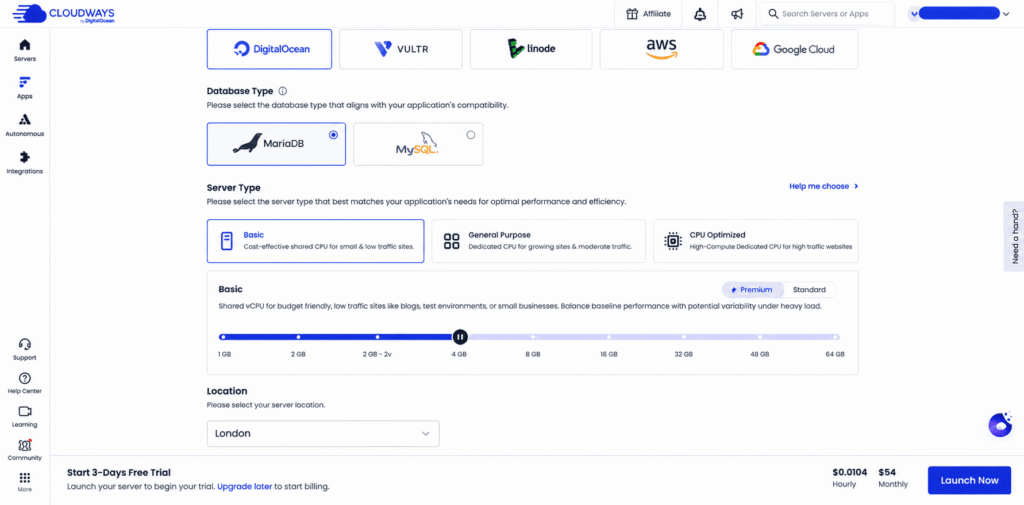
Does server location change the price?
On DigitalOcean and Vultr, prices are generally the same in every data center, so you can simply choose the location closest to your visitors. On AWS and Google Cloud, prices and bandwidth rates can vary by region. Whichever provider you choose, the Cloudways launch screen shows the exact price before you create the server.
Cloudways Autonomous pricing
Cloudways Autonomous is a newer, fully managed product built only for WordPress. You don’t choose or resize servers at all. The platform runs on Kubernetes, adds resources automatically when traffic spikes, and includes Cloudflare Enterprise CDN, Redis and Object Cache Pro out of the box. It’s aimed at business sites, publishers and stores that can’t afford slowdowns during a sale, a product launch or a viral post.
| Plan | Price/month | Autoscaling beyond baseline |
|---|---|---|
| Free trial | $0 for 3 days | – |
| Growth | $99 | $0.07 per hour per server |
| Scale | $199 | $0.10 per hour per server |
| Plus | $399 | $0.12 per hour per server |
| Enterprise | Custom | Custom |
Each paid plan comes with a baseline of resources. If your site uses more than that, Cloudways adds capacity automatically and bills it at the hourly rates above. Usage beyond the plan’s allowance is also charged at $1 per extra GB of disk and $0.04 per extra GB of bandwidth. Free managed migration is included on Growth, Scale and Plus.
The upside is that your site stays online and fast during traffic spikes without you doing anything. The trade-off is that your bill can vary from month to month, so it’s worth checking your usage in the dashboard during the first few months.
Flexible or Autonomous: which one should you choose?
| Flexible | Autonomous | |
|---|---|---|
| Starting price | $11/month | $99/month |
| Billing | Hourly, capped monthly | Monthly plan + usage above allowance |
| Scaling | Manual, a few clicks | Automatic |
| Applications | WordPress, WooCommerce, Magento, Laravel, PHP and more | WordPress only |
| Choice of cloud provider | Yes | No, managed for you |
| Number of sites | Unlimited per server | Depends on plan |
| Best for | Most blogs, small businesses, agencies, developers | Busy WordPress sites with traffic spikes |
For most people, Flexible is the better value. It’s far cheaper to start, supports more applications, and a small server can be upgraded in minutes when you grow. Autonomous is worth considering if your WordPress site regularly gets sudden traffic spikes and you’d rather pay more than ever think about server sizes again.
What’s included in every Cloudways plan
Part of the reason Cloudways costs more than budget shared hosting is that a lot of paid extras elsewhere come free here:
- Free SSL certificates for all your sites, renewed automatically
- Automated backups on a schedule you choose, with one-click restore
- Staging and cloning: test plugin updates or redesigns on a copy before going live
- Object Cache Pro and Redis for faster WordPress and WooCommerce
- Built-in firewall, bot protection and a WordPress vulnerability scanner
- Optimized server stack with caching already configured
- Unlimited websites and visits on Flexible servers
- 24/7 live chat support
- One free website migration, plus a free WordPress migration plugin
- Cloudways Copilot, an AI assistant for troubleshooting, with a few free credits on every plan
If you were to buy a premium caching plugin, a backup service, a staging tool and a security scanner separately, the total could easily be higher than the price of an entry Cloudways server.
Extra costs and add-ons
Cloudways doesn’t hide fees, but some services aren’t part of the base price. Here’s everything that can add to your bill:
| Add-on or usage | Approximate cost | Do you need it? |
|---|---|---|
| Extra bandwidth (DigitalOcean) | $0.02 per GB | Only if you exceed your server’s allowance |
| Bandwidth (AWS / Google Cloud) | $0.10–0.17 per GB | Always billed on usage |
| Off-site backup storage | $0.033 per GB per month | Usually just a few cents |
| Cloudflare Enterprise CDN | from $4.99 per domain per month | Optional, great for speed and security |
| Business email (Rackspace) | about $1 per mailbox per month | Only if you need email on your domain |
| Advance Support | $25/month (limited-time offer, normally $100) | Optional |
| Premium Support | about $500/month | Large businesses only |
| Extra managed migrations | Paid per site | Only for multiple non-WordPress sites |
| Domain name | Not sold by Cloudways | Buy from any registrar |
Bandwidth
Each DigitalOcean and Vultr server comes with a monthly bandwidth allowance, starting at 1 TB. That’s enough for tens of thousands of visits a month on a typical website. If you go over, the extra is cheap. On AWS and Google Cloud, every gigabyte is billed, so a site with lots of images or downloads can see a noticeably higher bill. Using a CDN reduces the bandwidth your server has to serve.
Backups
Automated backups are included, but they’re stored off-site and the storage they use is billed at about $0.033 per GB. For a typical WordPress site, this means a few cents to a dollar a month. You can lower it by reducing backup frequency or retention in the server settings.
Cloudways doesn’t include email hosting. You can add Rackspace email through Cloudways for about $1 per mailbox per month, or use Google Workspace, Zoho or another email provider. For sending website emails like order confirmations and password resets, you’ll want an SMTP service so messages don’t land in spam.
Support
Standard 24/7 live chat and ticket support is included in every plan and covers most questions. Advance Support adds faster response times and help with application-level issues. It normally costs $100/month or 10% of your invoice, but is currently offered for a flat $25/month. Premium Support adds a dedicated account manager and is aimed at larger businesses.
What a real Cloudways bill looks like
To make this concrete, here’s an example monthly bill for a small business website on a 2GB DigitalOcean server with Cloudflare Enterprise and two business email accounts:
| Item | Cost |
|---|---|
| DigitalOcean 2GB server (full month) | ≈ $24.00 |
| Off-site backup storage (about 10 GB) | ≈ $0.33 |
| Cloudflare Enterprise (1 domain) | $4.99 |
| Rackspace email (2 mailboxes) | ≈ $2.00 |
| Bandwidth | $0 (within allowance) |
| Total | ≈ $31.30/month + tax |
Without Cloudflare and email, the same site would cost about $24 a month. The point is that the server price is the main cost, and the extras are small and under your control.
Which Cloudways plan do you need?
Every site is different, but these rough guidelines will help you start in the right place. You can always scale up later.
| Type of site | Suggested server | Approximate cost |
|---|---|---|
| New blog, portfolio, landing page | DigitalOcean 1GB | $11/month |
| Small business site, growing blog | DigitalOcean 2GB | ≈ $24/month |
| WooCommerce store, membership site | DO Premium or Vultr HF, 2–4GB | ≈ $26–56/month |
| Agency with 10–20 client sites | DigitalOcean 4–8GB | ≈ $46–88/month |
| High-traffic store or publisher | 8GB+ or Autonomous | $88–199+/month |
A new blog or portfolio
A DigitalOcean 1GB server is enough for a new WordPress blog or a simple business site with a few thousand visitors a month. Keep plugins lean, use the built-in caching, and you’ll have a fast site for $11 a month.
A WooCommerce store
Online stores can’t be fully cached because carts, checkout and account pages are different for every visitor. That means more work for the server. Start with at least 2GB of RAM, ideally on a DigitalOcean Premium or Vultr High Frequency server. If you sell internationally, Cloudflare Enterprise is a worthwhile add-on.
An agency hosting client sites
Because Cloudways doesn’t charge per website, agencies can host many client sites on one 4GB or 8GB server. Spread across 15 sites, an $88 server works out to under $6 per site, with separate staging, backups and SSL for each one. Team access lets you give clients or developers access to specific apps only.
A busy site with traffic spikes
If your traffic jumps during launches, sales or news events, either choose a larger Flexible server with headroom or move to Autonomous, which scales automatically. Autonomous Growth at $99/month is the simplest option if you don’t want to monitor server load yourself.
Cloudways vs shared hosting vs a DIY cloud server
| Shared hosting | Cloudways | DIY cloud server | |
|---|---|---|---|
| Typical price | $2–4/month intro, higher on renewal | From $11/month, same every month | From a few dollars a month |
| Resources | Shared with many sites | Dedicated cloud server | Dedicated cloud server |
| Server management | Done by host | Done by Cloudways | Done by you |
| Speed | Varies with neighbors | Fast and consistent | Depends on your setup |
| Contract | Often 1–3 years prepaid | None, pay hourly | None |
| Support | Included | 24/7 included | None for your software |
Shared hosting is the cheapest way to get a site online, but the low price usually requires a long prepaid term and renews much higher. Because hundreds of sites share one server, performance can drop when a neighbor gets busy.
A DIY cloud server bought directly from DigitalOcean or Vultr gives you the same hardware for less money. But then you install and configure the web server, database and PHP yourself, handle security, set up backups, apply updates and fix problems at 3 a.m. Cloudways’ extra cost pays for all of that work.
Cloudways sits in the middle: dedicated cloud resources and consistent speed, without needing to be a server administrator, and at a price that doesn’t jump after the first year.
How to save money on Cloudways

- Test with the free trial first. Three days is enough to migrate a copy of your site, check speed and talk to support before you pay anything.
- Start small and scale later. Upgrading takes a few clicks and a couple of minutes, so there’s no reason to pay for resources you don’t use yet.
- Put several sites on one server. One mid-size server is usually cheaper than several separate hosting plans.
- Add storage gradually. Disk space can be increased but not reduced, so don’t over-buy it.
- Use the free tools. Built-in caching, SSL, backups and staging replace several paid plugins and services.
- Delete servers you don’t need. Flexible servers are billed hourly while they exist, even if nothing is running on them.
- Check for a welcome discount. New customers can usually get a discount for the first months. For example, promo code AMGCLOUD currently gives 30% off for the first 3 months; you can find all current offers in our Cloudways promo codes guide.
- Time big purchases. Cloudways’ largest sale of the year usually runs around Black Friday and Cyber Monday.
Is Cloudways worth the price?
For most growing websites, yes. You pay more than you would for budget shared hosting, but you get your own cloud resources, faster and more consistent load times, built-in caching and security, honest pay-as-you-go billing, and the freedom to scale or switch providers at any time. If your website earns money through sales, leads or ads, even a small improvement in speed and uptime can cover the difference.
| Pros | Cons |
|---|---|
| Transparent pay-as-you-go pricing | More expensive than basic shared hosting |
| No contracts or renewal price jumps | No domain or email included |
| Unlimited sites per Flexible server | Some add-ons cost extra |
| Choice of four major cloud providers | AWS and Google Cloud get pricey |
| Free SSL, backups, staging and caching | Autonomous bills can vary with traffic |
| Free 3-day trial, no card required | Learning curve if you’ve only used cPanel |
Cloudways is probably not the best fit if you only need a tiny personal page and want the absolute lowest price, or if you want your domain, email and hosting bundled in one cheap package.
Cloudways pricing FAQ
How much does Cloudways cost per month?
Cloudways Flexible plans start at $11/month for a 1GB DigitalOcean server and go up to several hundred dollars for large servers. Autonomous plans start at $99/month. Most small and medium websites pay between $11 and $50 a month.
What is the cheapest Cloudways plan?
The cheapest plan is the DigitalOcean Standard 1GB Flexible server at $11/month, which includes 25 GB of storage and 1 TB of bandwidth.
Does Cloudways charge monthly or hourly?
Flexible servers are billed hourly, capped at the monthly price, and invoiced once a month. Autonomous plans have a fixed monthly price plus charges for usage above the plan’s allowance.
Does Cloudways have hidden fees?
No hidden fees, but some things cost extra: bandwidth above your allowance, off-site backup storage, business email, Cloudflare Enterprise and premium support. A domain name isn’t included either.
Does Cloudways raise prices on renewal?
No. There’s no long-term contract and no intro price, so you pay the same rate every month. The only temporary price change is a welcome discount for new customers, which applies to the first months only.
Is there a free Cloudways plan?
There’s no permanent free plan, but there’s a free 3-day trial with no credit card required. You can launch a real server and test your site during the trial.
Can I change my plan later?
Yes. You can scale a Flexible server up in a few clicks, and the new hourly rate applies from that moment. Storage can be increased but not reduced. You can also clone your site to a server on a different provider if you want to switch.
How many websites can I host on one server?
On Flexible plans there’s no limit on the number of websites. The real limit is your server’s resources: a 1GB server comfortably runs a few small sites, while 4–8GB servers can host dozens of light sites.
Is there a Cloudways discount for new customers?
Yes. New customers can get 30% off for the first 3 months with promo code AMGCLOUD when they sign up for Cloudways. Cloudways also runs bigger seasonal sales, especially around Black Friday.
Final thoughts
Cloudways pricing comes down to one simple decision: which server do you need right now? For most websites, the answer is a DigitalOcean Flexible server starting at $11/month. Test it during the free 3-day trial, keep an eye on your usage, and scale up only when your traffic grows. Busy WordPress businesses that want completely hands-off scaling can look at Autonomous from $99/month.
Whichever plan you choose, you’ll know exactly what you pay for, with no contracts and no renewal surprises.
Prices are in USD, exclude taxes and are based on the official Cloudways pricing page. Prices marked “≈” are approximate. Cloudways can change its prices at any time, so always confirm the final amount on the server launch screen or at checkout.
Disclosure: some links on PromoFoxx are affiliate links. If you buy through them, we may earn a commission at no extra cost to you.