

Cloudways Review: Is This Managed Cloud Hosting Worth It?
Updated: November 2026
Shared hosting is cheap, but sooner or later many site owners hit its limits: slow pages during traffic spikes, “resource limit reached” errors and renewal prices that are two or three times higher than the first bill. Cloudways promises a different approach: your own cloud server, fully managed for you, billed by the hour and without contracts.
In this Cloudways review we look at how the platform works, what you get for the money, how easy it is to use, how good the support is, and who should (and shouldn’t) choose it. By the end you’ll know whether Cloudways is the right home for your website.
Cloudways review at a glance
- Our rating: 4.6 / 5
- Type: managed cloud hosting
- Price: from $11/month, billed hourly
- Cloud providers: DigitalOcean, Vultr, AWS, Google Cloud
- Free trial: 3 days, no credit card required
- Best for: growing websites, WooCommerce stores, agencies and freelancers
- Not ideal for: complete beginners who want domain and email bundled in one package
What is Cloudways?
Cloudways is a managed cloud hosting platform founded in 2011 and owned by DigitalOcean since 2022. Instead of renting a small slice of a crowded shared server, you get your own cloud server from a major infrastructure provider. Cloudways installs, configures, secures, updates and monitors that server, so you get cloud performance without needing to be a server administrator.
Everything is managed from one dashboard: servers, websites, backups, domains, SSL certificates and team access. The platform supports WordPress, WooCommerce, Magento, Laravel and custom PHP applications, and you can host as many websites on a server as its resources allow.
How Cloudways works
Cloudways offers two products, and choosing between them is the first decision you’ll make.
Cloudways Flexible
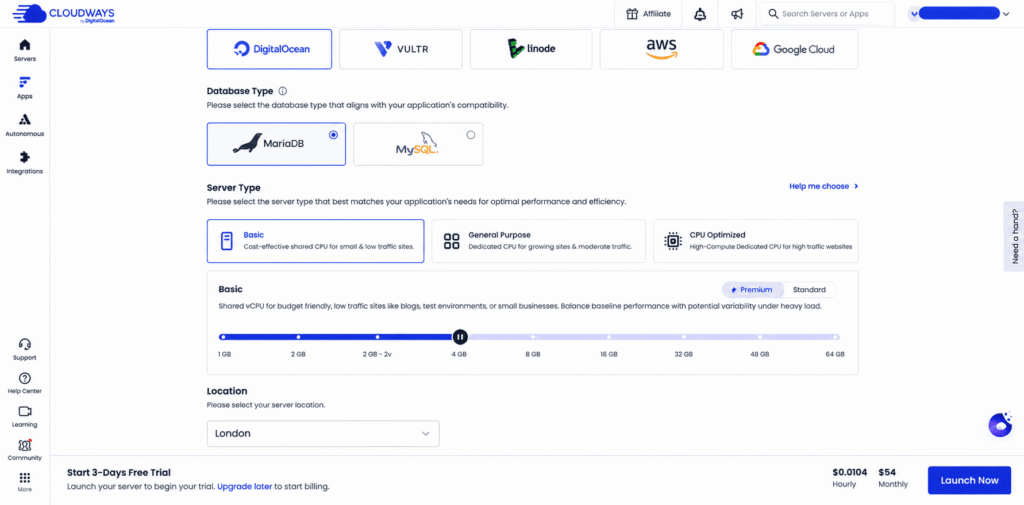
Flexible is the classic Cloudways product and the right choice for most users. You pick a cloud provider, a data center location and a server size, and Cloudways launches the server in a few minutes. You can resize it at any time with a few clicks, and you pay by the hour, capped at the monthly price.
- DigitalOcean is the most popular and affordable option, ideal for blogs, business sites and small stores.
- Vultr offers fast High Frequency servers and many data center locations.
- AWS and Google Cloud are premium options for businesses that need a specific region or already work in those ecosystems.
Cloudways Autonomous
Autonomous is a newer, fully managed product built only for WordPress. You don’t choose or resize servers at all: the platform adds resources automatically when traffic grows and includes Cloudflare Enterprise CDN and advanced caching out of the box. It starts at a much higher price and is aimed at busy WordPress sites that can’t afford slowdowns during sales or viral traffic.
In the rest of this review we focus mainly on Flexible, since it’s what most readers will use.
Data center locations
Between its four cloud providers, Cloudways offers dozens of data center locations across North America, Europe, Asia, Australia and other regions. Choosing a location close to most of your visitors is one of the easiest ways to make your site faster, since every page request travels a shorter distance. If you’re not sure, check where your traffic comes from in Google Analytics or Search Console and pick the nearest data center.
Getting started with Cloudways
Signing up takes a couple of minutes. You create an account with your email, confirm it, and you can launch your first server right away during the free 3-day trial, without adding a credit card.
Launching a server is a single screen: choose the application (for example WordPress), name your app and server, pick a cloud provider, server size and location, and click Launch Now. A few minutes later you have a working WordPress site on its own cloud server, already configured with caching and security.
Moving an existing website
If you already have a website elsewhere, Cloudways offers two ways to move it:
- Do it yourself with the Cloudways WordPress Migrator plugin. Install the plugin on your old site, enter the details of your new Cloudways application, and the plugin copies files and the database automatically. For most small and medium WordPress sites this takes well under an hour.
- Request a managed migration. The Cloudways team moves the site for you. Your first migration is free, which is useful if you’re not comfortable doing it yourself or your site isn’t built on WordPress.
After the files are copied, you test the site on its temporary Cloudways URL, add your domain in the dashboard, update your DNS records at your domain registrar and install a free SSL certificate. Because the old site keeps running until DNS switches over, visitors don’t see any downtime.
Performance and speed
Speed is the main reason people move to Cloudways, and the platform is built around it. Because your site runs on its own server, it doesn’t share CPU and memory with hundreds of other websites, so a traffic spike on someone else’s site won’t slow yours down.
On top of that, every server comes with an optimized software stack:
- Optimized web server stack with server-level caching already configured
- Redis and Object Cache Pro for faster database-heavy WordPress and WooCommerce sites
- Latest PHP versions, switchable from the dashboard
- NVMe storage on premium server types
- Cloudflare Enterprise CDN as an optional add-on, with edge caching, image optimization and extra security
The result is that a well-built WordPress site on even a small Cloudways server is usually noticeably faster than on typical shared hosting, especially for logged-in users, online stores and dynamic pages that can’t be fully cached. Real speed always depends on your theme, plugins and images, but Cloudways removes the server as the bottleneck.
Which server size do you need?
Choosing a server size is the part new users worry about most, but it’s less critical than it seems: you can upgrade in a few minutes whenever you need more power. As a starting point, these sizes on DigitalOcean work well for most sites:
| Type of website | Suggested server | Why |
|---|---|---|
| New blog or portfolio | 1–2 GB RAM | Plenty for low to moderate traffic and a cached WordPress site |
| Business website, several small sites | 2–4 GB RAM | Room for a few sites, plugins and traffic growth |
| WooCommerce store | 4 GB RAM or more, Premium server | Carts, checkouts and logged-in customers can’t be fully cached and need more CPU and memory |
| Agency hosting many client sites | 8 GB RAM or more | Many sites and admin users working at the same time |
| High-traffic site or membership platform | 16 GB RAM or more, or Autonomous | Heavy dynamic traffic and frequent spikes |
A good habit is to start one size smaller than you think you need, watch CPU and memory usage in the Cloudways monitoring graphs for a couple of weeks, and scale up only if usage stays high. Since billing is hourly, you only pay the higher rate from the moment you upgrade.
Key features
Unlimited websites per server
Cloudways doesn’t charge per website. You pay for server resources and can host as many sites on a server as it can handle. For agencies and anyone running several projects, this alone can make Cloudways cheaper than “per-site” hosting.
Staging and cloning
You can create a staging copy of any site in one click, test plugin updates or a redesign there, and push the changes live when you’re ready. Cloning a whole application or server is just as easy, which is useful for starting new client projects from a template.
Automated backups
Backups run automatically on a schedule you choose, and any backup can be restored with one click. You can also take an on-demand backup before a risky change. Off-site backup storage is billed separately at a small per-GB rate.
Security
Every server includes a built-in firewall, free SSL certificates with automatic renewal, regular OS and security patches, bot protection and a WordPress vulnerability scanner. Two-factor authentication and IP whitelisting protect the dashboard itself. Malware protection and Cloudflare Enterprise are available as paid add-ons.
Cloudways Copilot
Copilot is Cloudways’ AI assistant. It monitors your servers and applications, detects problems such as high resource usage or errors, explains what’s going on in plain language and suggests a fix, often applied with one click. Flexible plans include a number of free Copilot credits.
Monitoring and server management
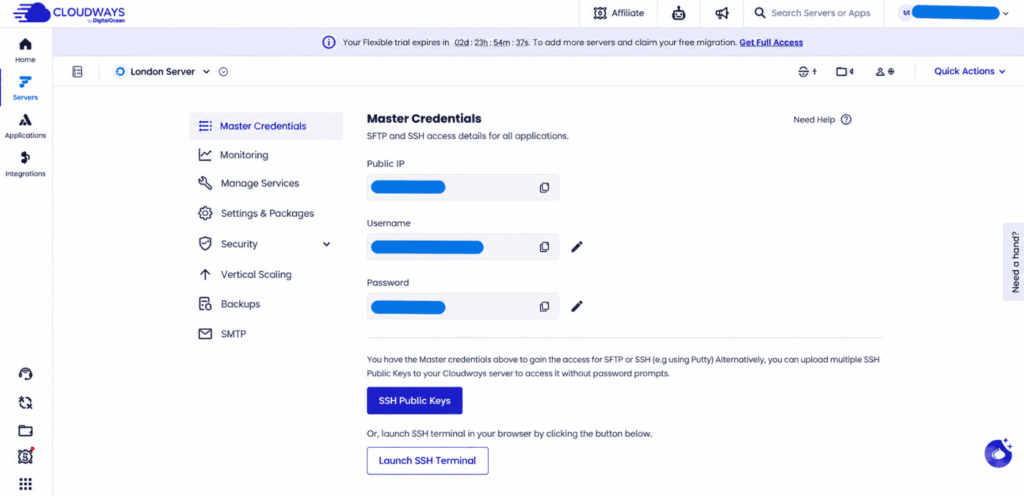
The dashboard shows real-time graphs of CPU, memory, disk and bandwidth usage for each server, along with the slowest pages and plugins on your WordPress sites. You can restart services such as the web server, PHP or the database, set up cron jobs, manage SSH and SFTP users, change PHP settings and schedule updates without contacting support. Cloudways also monitors servers around the clock and alerts you by email when something needs attention.
Team and client management
You can invite team members with specific permissions, give a developer access to one server only, or transfer a finished site to a client’s own Cloudways account. These tools make Cloudways especially popular with freelancers and agencies.
Ease of use
Cloudways sits between beginner-friendly shared hosting and a raw cloud server. You don’t need to touch the command line: launching servers, adding sites, switching PHP versions, enabling caching, adding SSL and restoring backups are all done in the dashboard.
That said, the dashboard uses its own interface instead of the familiar cPanel, and some concepts, such as servers versus applications, take a little getting used to. Most people find their way around within the first day, and the free trial is a good chance to explore before paying.
One thing to know in advance: Cloudways doesn’t include email hosting or free domains. You register your domain elsewhere and point it to Cloudways, and add a business email service separately, either through Cloudways’ paid email add-on or another provider.
Cloudways for WooCommerce stores
Online stores are where Cloudways shines most. Product pages can be cached, but carts, checkouts and customer accounts are generated fresh for every visitor, which is exactly where cheap shared hosting slows down. On Cloudways, your store runs on its own server with Redis and Object Cache Pro, which speed up the database queries WooCommerce relies on.
For stores, we recommend a Premium DigitalOcean or Vultr High Frequency server with at least 4 GB of RAM, staging for testing updates before they reach customers, and scheduled backups at least once a day. If you run big sales or seasonal campaigns, scale the server up a day before the sale starts and back down afterwards, paying the higher rate only for those days.
Cloudways for agencies and freelancers
Cloudways is a popular choice among web agencies, and it’s easy to see why. One server can host many client sites, so the cost per site drops as you grow. Team members can get access to specific servers only, client sites can be transferred to the client’s own account when a project ends, and staging makes it safe to update client sites without breaking them.
Many agencies host client sites on their own Cloudways servers and include hosting in a monthly maintenance fee, which turns hosting into a steady source of recurring income.
Cloudways pricing
Cloudways pricing is different from typical hosting. You don’t pay years in advance and there are no renewal price jumps. Flexible servers are billed by the hour, with the monthly total capped at the listed price, and you can delete a server at any time to stop charges.
- Flexible: from $11/month on DigitalOcean; AWS and Google Cloud cost more
- Autonomous: from $99/month, plus usage above the plan’s baseline
- Paid extras: business email, off-site backup storage, Cloudflare Enterprise, malware protection and higher support tiers
Cloudways isn’t the cheapest host on paper, but you’re paying for a dedicated cloud server and management, not a crowded shared plan. For a full breakdown of every plan and add-on, read our Cloudways pricing guide.
Which add-ons are worth paying for?
- Cloudflare Enterprise: worth it for stores and sites with visitors around the world. It adds edge caching, image optimization and stronger DDoS protection for a few dollars per domain.
- Off-site backup storage: automated backups are included, and the extra storage cost is small. Worth keeping for any site you can’t afford to lose.
- Email: only if you don’t already use an email provider. If you already have business email elsewhere, there’s no need to move it.
- Advanced support: mainly for businesses that need faster responses and help beyond the server level. Most small sites do fine with standard support.
Customer support
Every plan includes 24/7 support via live chat and tickets, plus a large knowledge base and community. Standard support handles server and platform issues well, and live chat usually responds within minutes.
Keep in mind what “managed” covers: Cloudways takes care of the server, but help with your own website code, themes or plugins is limited on the standard tier. If you want faster responses and deeper help with application issues, Cloudways offers paid Advanced and Premium support plans.
Tips for getting the most out of Cloudways
- Pick the data center closest to your audience, not the one closest to you.
- Turn on Redis and Object Cache Pro for WordPress and WooCommerce sites.
- Use a caching plugin such as Breeze, Cloudways’ free caching plugin, or another plugin compatible with the server cache.
- Schedule daily backups and take a manual backup before big updates.
- Test updates on staging first, especially for stores and client sites.
- Check the monitoring graphs monthly and resize the server only when usage stays high.
- Enable two-factor authentication on your Cloudways account.
Pros and cons
Pros
- Your own cloud server with fast, optimized performance
- Hourly billing with no contracts and no renewal price increases
- Unlimited websites per server
- Choice of DigitalOcean, Vultr, AWS and Google Cloud
- Free SSL, automated backups, staging and caching included
- Easy scaling as your traffic grows
- Excellent tools for agencies and team work
- Free 3-day trial without a credit card
Cons
- No email hosting or free domain included
- No cPanel, so there’s a short learning curve
- Higher starting price than budget shared hosting
- Some useful features are paid add-ons
- Standard support doesn’t cover in-depth help with your site’s code
Who should use Cloudways?
Cloudways is a great fit if you:
- have outgrown shared hosting and want a faster, more stable site
- run a WooCommerce store or another dynamic site where speed affects sales
- manage several websites, for yourself or for clients
- want cloud performance without managing a server yourself
- prefer paying monthly with no long-term commitment
You may want something else if you:
- are launching your very first small site on the lowest possible budget
- want domain, email and hosting bundled in a single package
- rely heavily on cPanel and don’t want to learn a new dashboard
How to save on Cloudways
Start with the free 3-day trial to test the platform on a real server. When you’re ready to upgrade, a promo code can lower your first bills: code AMGCLOUD gives new customers 30% off for the first 3 months plus free migrations. Choosing the right server size from the start and adding paid extras only when you need them will also keep your bill under control. For all current offers, see our Cloudways promo codes page, and if you can wait until November, check our Cloudways Black Friday guide.
Cloudways review FAQ
Is Cloudways good for beginners?
Yes, if you’re comfortable learning a new dashboard. You don’t need any server skills: everything from launching WordPress to SSL and backups is done with a few clicks. Complete beginners who want email and a domain included may find all-in-one shared hosting simpler at first.
Is Cloudways good for WordPress?
Yes. WordPress is the most popular application on Cloudways, and the platform includes WordPress-specific tools such as Object Cache Pro, Redis, staging, a vulnerability scanner and one-click migration.
Does Cloudways include email and a domain?
No. You register your domain with any registrar and point it to Cloudways. Email can be added through Cloudways’ paid email add-on or any external email provider.
Can I cancel Cloudways at any time?
Yes. There are no contracts. Flexible servers are billed by the hour, so when you delete a server, charges for it stop.
Does Cloudways have a free trial?
Yes. You get a free 3-day trial with full access to the platform, and no credit card is required to start.
Is Cloudways worth the money?
For growing websites, online stores and agencies, usually yes. You get a dedicated cloud server, strong performance, free migrations and flexible billing. For a tiny personal site with very little traffic, cheaper shared hosting may be enough.
How long does it take to move a site to Cloudways?
A typical WordPress site can be moved with the Cloudways Migrator plugin in under an hour. Managed migrations done by the Cloudways team usually take longer because they’re scheduled in a queue, but you don’t have to do anything yourself.
Can I upgrade or downgrade my server later?
Yes. You can scale a Flexible server up with a few clicks, and billing changes from that moment. Scaling down is more limited because storage can’t shrink, so if you need a smaller server, you can clone your site to a new, smaller server and delete the old one.
Where are Cloudways data centers located?
Cloudways offers dozens of locations across North America, Europe, Asia, Australia and other regions through DigitalOcean, Vultr, AWS and Google Cloud. You choose the location when you launch a server.
Final verdict
Cloudways delivers what it promises: real cloud performance without the headache of managing a server. Hourly billing, no contracts, unlimited sites per server and a clean dashboard make it one of the best choices for growing websites, WooCommerce stores and agencies. The missing email hosting and the higher starting price are the main trade-offs, but for most sites that need speed and stability, they’re easy to accept.
The best way to decide is to try it yourself: start a free Cloudways trial, launch a test server and see how your site performs.
Disclosure: some links on PromoFoxx are affiliate links. If you sign up through them, we may earn a commission at no extra cost to you. Our reviews are based on the platform’s features, pricing and public information, and prices may change at any time.