

AdsPower Referral Code 50POWER: Get 50% Off (November 2026)
Updated: November 2026. We check this code regularly.
Looking for a working AdsPower referral code? Use 50POWER when you create your AdsPower account to get 50% off any subscription. Below we explain exactly where to enter the code, who can use it, how much you’ll save on each plan, and what to do if the code doesn’t work.
AdsPower referral code at a glance
- Code: 50POWER
- Discount: 50% off any subscription
- Where to enter it: the Referral code field on the sign-up form
- Who can use it: new AdsPower accounts
- Free plan: available without a code, 2 profiles
You can also see all current AdsPower offers, including any limited-time deals, on our AdsPower promo codes page.
What is an AdsPower referral code?
An AdsPower referral code is a short code you enter while creating your account. It links your new account to a referral offer and unlocks a discount on paid plans. Unlike a regular coupon that you enter at checkout, AdsPower asks for the code during registration, in a dedicated Referral code field.
That detail matters: if you skip the field when signing up, you usually can’t add the code later. So have the code ready before you create your account.
How to use the AdsPower referral code
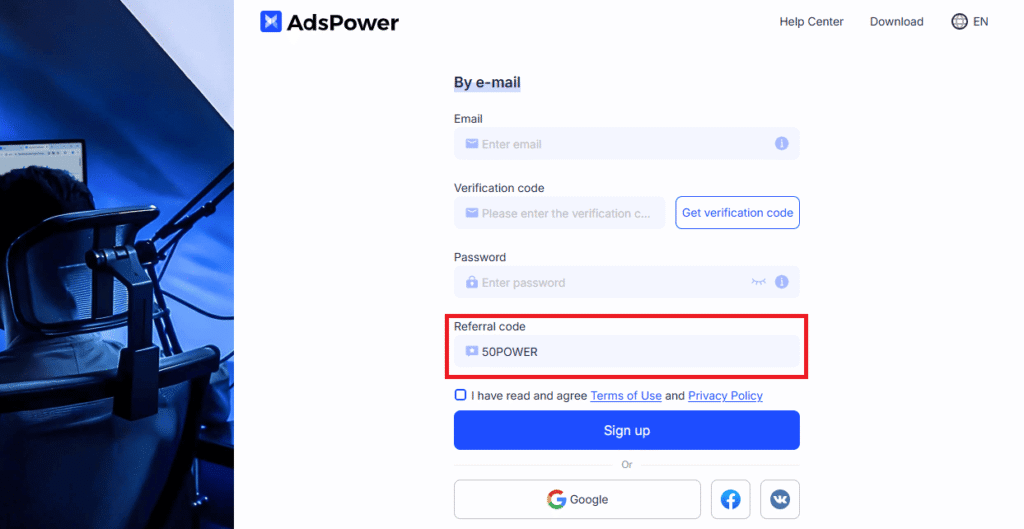
- Copy the code. Copy 50POWER, or open our AdsPower coupons page and click Show code. The code is copied automatically and the AdsPower website opens in a new tab.
- Open the sign-up page. On the AdsPower website, click Sign Up.
- Fill in your details. Enter your email, click Get verification code, type the code you receive by email and create a password.
- Paste the referral code. In the Referral code field, paste 50POWER. Check that there are no extra spaces.
- Create your account. Accept the Terms of Use and Privacy Policy and click Sign up.
- Choose a plan. Start on the free plan or pick a paid subscription. Your discount applies when you pay for a subscription.
Signing up with Google or Facebook? Make sure the Referral code field is filled in before you click the social login button, or use email sign-up to be sure the code is attached to your account.
How much can you save with 50POWER?
AdsPower’s price depends on how many browser profiles you need and how long you pay for. Here’s what 50% off looks like on monthly Professional plans:
| Professional plan | Regular price | With 10POWER |
|---|---|---|
| 10 profiles | $9.00/mo | ≈ $8.10/mo |
| 20 profiles | $12.00/mo | ≈ $10.80/mo |
| 50 profiles | $21.00/mo | ≈ $18.90/mo |
| 100 profiles | $36.00/mo | ≈ $32.40/mo |
The bigger your plan, the more you save. Teams on the Business plan, which starts at 200 profiles, save the most in absolute terms. For a full breakdown of plans, billing periods and team costs, read our AdsPower pricing guide.
Prices are approximate and may differ at checkout. AdsPower can change its prices and promotion terms at any time.
Who can use the AdsPower referral code?
- New users only. The code must be entered when the account is created.
- One code per account. You can’t combine two referral codes.
- Any paid subscription. The discount applies to paid AdsPower plans, not to the free plan, which already costs nothing.
- Individuals and teams. Freelancers, agencies and companies can all use it when opening a new account.
AdsPower referral code not working? Try this
- Check for typos and spaces. The code is 50POWER: the number 50 followed by POWER in capital letters.
- Make sure you’re creating a new account. Referral codes can’t be added to an existing account.
- Fill in the field before social login. If you sign up with Google or Facebook, the code may not be saved. Try email registration instead.
- Check the conditions. Some offers apply only to specific plans or billing periods. The terms are shown under each code on our AdsPower page.
- Contact AdsPower support. If you entered the code correctly but don’t see the discount, AdsPower’s online support can check your account.
Try AdsPower for free first
You don’t have to pay to start. AdsPower has a free-forever plan with 2 browser profiles, and you can try all features free for 7 days. A good approach is to sign up with the referral code, test AdsPower on the free plan or trial, and upgrade when you know how many profiles you need. Since the code is attached to your account at registration, the discount is ready when you decide to pay.
What is AdsPower?
AdsPower is an antidetect browser for managing multiple accounts from one place. Each browser profile works like a separate device, with its own fingerprint, cookies, storage and proxy, so accounts stay separate from each other.
It’s widely used by marketing agencies that run ad and social media accounts for clients, e-commerce sellers with stores on several marketplaces, and teams that need to share account access without sharing passwords. Key features include:
- Separate browser profiles with custom fingerprints
- A different proxy for every profile (HTTP, HTTPS, SOCKS5)
- Chrome-based and Firefox-based browser engines
- Team access with roles and permissions
- RPA automation and a local API for repetitive tasks
- Profile sync across computers
Other ways to save on AdsPower
- Pay annually. Annual billing saves up to 40% compared with monthly payments, and quarterly billing saves 15%.
- Buy the right number of profiles. Most people need one profile per account. Paid plans also include 2 extra free profiles.
- Add team seats only when needed. Solo users don’t need any.
- Watch for seasonal sales. Software companies often run their biggest discounts around Black Friday. We add new AdsPower deals to this page as soon as they appear.
AdsPower referral code FAQ
What is the best AdsPower referral code?
Use 50POWER to get 10% off any AdsPower subscription. Enter it in the Referral code field when you create your account.
Where do I enter the AdsPower referral code?
On the AdsPower sign-up form, below the email, verification code and password fields, there’s a field called Referral code. Paste the code there before you click Sign up.
Can I add a referral code after registration?
Usually not. The referral code is linked to your account when it’s created, so it must be entered during sign-up.
Does the referral code work with annual plans?
The code gives 10% off subscriptions, and annual billing has its own discount of up to 40%. Check the final price at checkout to see the total saving for your chosen plan and billing period.
Is AdsPower free?
Yes. AdsPower has a free-forever plan with 2 browser profiles and a 7-day free trial of all features. The referral code is useful when you upgrade to a paid plan.
Is it safe to use a referral code?
Yes. A referral code only applies a discount to your new account. It doesn’t give anyone access to your account or data. Always download AdsPower from its official website.
Final thoughts
Getting an AdsPower discount takes one extra step: enter referral code 50POWER in the Referral code field when you sign up. Test the platform on the free plan or 7-day trial, choose the number of profiles you actually need, and your 10% discount will be ready when you upgrade.
Disclosure: some links on PromoFoxx are affiliate links, and we may earn a commission if you sign up using our referral code, at no extra cost to you.